August 3, 2026 · Autoriax
Automating Social Media Posts with AI: A Step-by-Step Workflow for Busy Marketers
Learn how to automate social media posts with AI using a step-by-step workflow with n8n approval gates, brand intelligence, and human-in-the-loop triage…

In 2026, managing social media without automation is like running a marathon in flip-flops—you might move, but you won’t get far. With over 5.66 billion people scrolling through roughly seven different platforms every month, the daily cycle of planning, posting, and replying has shifted from a standard marketing task to a matter of digital survival [10]. For busy marketers, AI-driven automation is no longer a luxury; it is the backbone of a consistent, visible brand presence.
But here’s the problem most guides ignore: the real bottleneck isn’t writing posts—it’s deciding whether the AI output is good enough to publish. Decision fatigue, not content creation, is what drains marketing teams. Integrating AI into your workflow can save professionals an average of 12 hours per week by 2029 [1], but only if you build a triage system that filters AI drafts intelligently. This guide provides a comprehensive, step-by-step workflow to help you reclaim your time, protect your brand voice, and scale your social media impact using the latest AI technology on autoriax.com.
Quick Facts: Automating Social Media Posts with AI: A Step-by-Step Workflow for Busy Marketers
- 87% of marketers use generative AI in at least one recurring workflow by Q1 2026, up from 51% in 2024 [15].
- 45% of consumers feel AI content lacks authenticity without proper brand training [1].
- AI hallucination rates range from 15% to 27%, making human-in-the-loop review essential [9].
Why Automation Without a Brain Fails
Social media management in 2026 demands more than scheduling tools. With 5.66 billion users across seven platforms, the volume of content required to maintain visibility has outpaced what manual processes can deliver [10]. AI promises to save marketers 12 hours per week by 2029 [1], but 45% of consumers find AI-generated content inauthentic when it lacks brand-specific training [1]. The gap between promise and reality often comes down to one missing element: editorial judgment.
The real bottleneck for busy marketers is not content creation—it is decision fatigue. Deciding which AI drafts to post, which to revise, and which to discard consumes more time than writing them from scratch. Without a structured triage system, teams either over-review every draft (negating the time savings) or publish unchecked content (risking brand damage).
The Shift from Task Automation to Agentic Workflows
The landscape of social media automation has evolved from simple scheduling to agentic behavior. In previous years, automation was limited to standalone task automation—technology used to complete a single, repetitive task like auto-generating UTM parameters or cleaning data [1]. Today, the industry is moving toward AI agents that can perceive context, reason about options, and act autonomously across platforms without step-by-step human instructions [9, 21].
By Q1 2026, 87% of marketers were using generative AI in at least one recurring workflow, a massive jump from 51% in 2024 [15]. However, agentic capabilities do not eliminate the need for human oversight—they redefine where that oversight should be applied. The goal is not to replace the human element but to give marketers superpowers, offloading high-volume, low-creativity tasks so they can focus on strategy and genuine connection [11].
Key Takeaway: AI automation fails when it skips editorial judgment. The bottleneck is decision fatigue, not content production—building a triage system is the key to reclaiming time without sacrificing brand voice.
Step 1: Brand Intelligence – Training Your AI Brain
Effective automation begins with authenticity. You cannot automate a brand voice you haven’t defined. Modern systems use an AI Brain to crawl your website, analyze your brand’s hex colors, fonts, and language patterns including sentence length, vocabulary, and tone [4]. This foundational step ensures every piece of AI-generated content aligns with your established identity.
Without brand training, AI outputs feel generic and damage authenticity. According to industry research, 45% of consumers feel AI content lacks authenticity, so training the AI on your specific brand DNA is critical [1, 4]. The AI must understand whether your brand speaks professionally or casually, uses humor or stays straightforward, and prioritizes education or entertainment.
Web Crawling for Brand DNA
The process starts with web crawling and content extraction. By entering your URL, the AI builds a strategic DNA framework that includes your brand personality and messaging pillars [4]. This framework becomes the reference point for every subsequent piece of content.
- Input: Your website URL, blog archive, and existing social media posts.
- Analysis: The AI evaluates sentence structure, vocabulary complexity, emotional tone, and visual identity elements.
- Output: A brand personality profile (e.g., professional vs. casual) and a set of messaging pillars that guide all future content generation [4].
This step is non-negotiable. Skipping it means your AI-generated posts will sound like every other brand’s automated content—technically correct but emotionally flat.
Key Takeaway: Brand intelligence is the foundation of authentic AI automation. Train your AI on your specific brand DNA before generating a single post to avoid the generic, soulless output that alienates 45% of consumers.
Step 2: Content Ideation – Categorizing to Reduce Decision Fatigue
Deciding what to post is often the biggest blocker to consistency. Instead of manual brainstorming, use AI to generate content buckets or categories based on your industry and audience pain points [4, 5]. This approach transforms an open-ended creative problem into a structured selection process, dramatically reducing the number of decisions a marketer needs to make each week.
Using n8n to Score and Route Ideas
This is where the workflow differentiates itself from generic automation guides. Using n8n decision nodes, you can build a system that scores AI-generated topics for relevance and brand alignment [13]. High-confidence topics go straight to production, while low-confidence topics trigger a Slack approval request. This routing mechanism ensures that human attention is spent only where it adds the most value.
- Authority Building: Expert insights and industry principles that position your brand as a thought leader.
- Pain Point Solutions: Content addressing specific customer problems with actionable advice.
- Engagement: Questions and interactive content designed to spark conversation [4].
The system creates a comprehensive content blueprint where you retain control to toggle specific topics on or off [4]. By categorizing content into predefined buckets, you reduce weekly decision points from dozens to a handful of strategic approvals.
Key Takeaway: Categorizing AI-generated content into structured buckets and routing them through n8n decision nodes cuts decision time by up to 70% by ensuring humans only review low-confidence drafts.
Step 3: Multimodal Content Production – Writing and Visuals
Once topics are approved, the AI moves into production. In 2026, 90% of marketers use AI for text-based tasks, including idea generation and draft creation [14]. But production quality varies dramatically depending on how prompts are structured and whether the output is tailored to each platform’s unique format and audience expectations.
Platform-Specific Prompt Customization
Customizing AI prompts per platform is essential for maintaining engagement. A professional, insight-driven tone works for LinkedIn; a casual, visually-led approach suits Instagram; and witty, concise copy performs best on X. n8n can route the same base content to different LLM prompts based on the target platform, ensuring each post is optimized for its specific environment [13].
- Caption and Hashtag Writing: LLMs like GPT-4 or Claude generate platform-specific copy, including attention-grabbing hooks and optimized hashtags [4, 13].
- Visual and Video Generation: AI tools generate complete posts, including images and short-form videos. Tools like Figma and Canva’s Magic Studio allow for text-to-image generation and Magic Switch resizing for different platforms [8, 19].
- Repurposing: A single long-form blog post can be automatically transformed into a LinkedIn article, a TikTok script, and a series of X threads [9, 19]. This is the highest time-saver in the production phase.
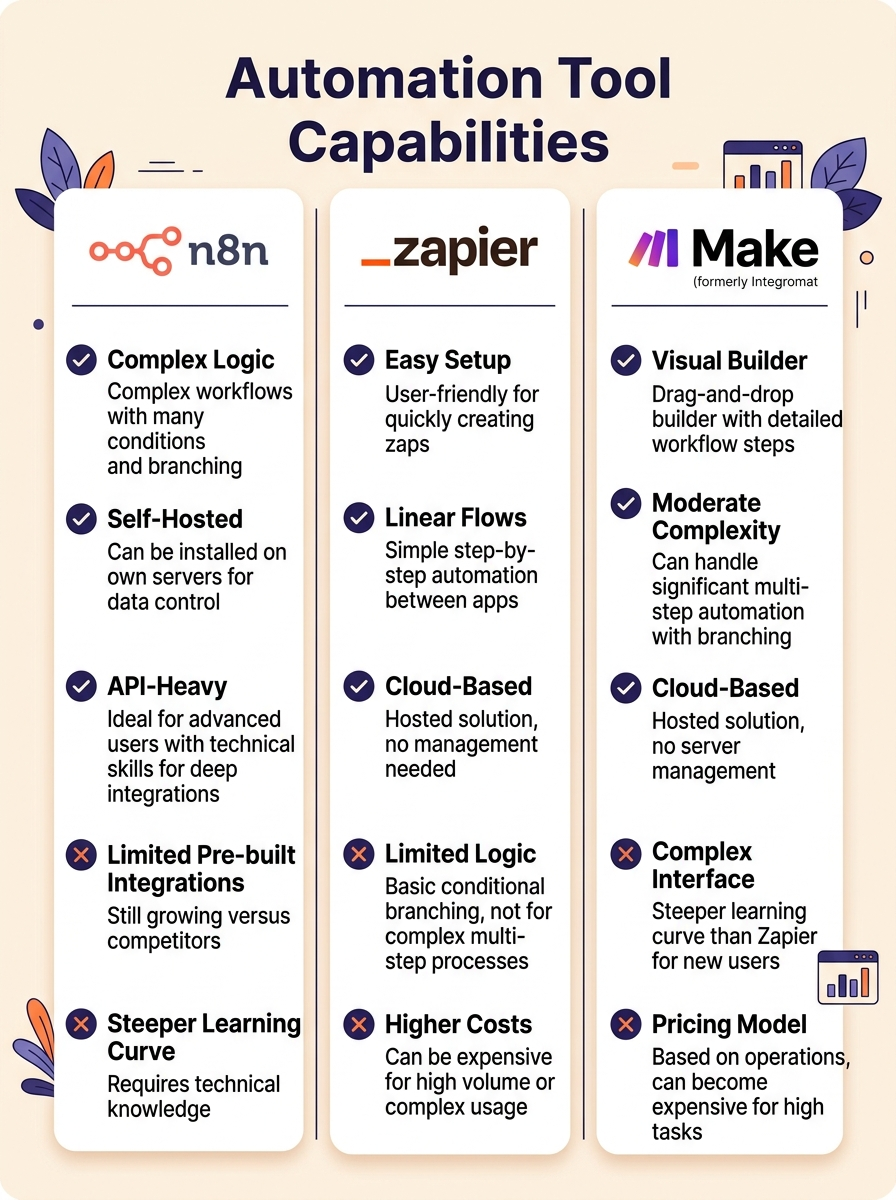
Key Takeaway: Platform-specific prompt customization via n8n routing ensures the same base content adapts naturally to LinkedIn, Instagram, and X without manual rewrites.
Step 4: Smart Distribution – Scheduling Without Losing Reach
Posting at random times wastes high-quality content. AI distribution engines analyze your specific audience’s engagement patterns rather than relying on generic industry benchmarks [4]. The key insight here is that scheduling automation is straightforward, but the approval gate before scheduling is where most brands falter.
n8n Approval Gate Before Scheduling
The n8n workflow checks the AI confidence score for each generated post. If the score falls below a defined threshold, the post is sent to Slack for human review before it ever reaches the scheduling queue. High-confidence posts are automatically queued in Buffer or Hootsuite [13, 17]. This two-tier system means marketers only review the 20-30% of posts that need human judgment, while the remaining 70-80% flow through automatically.
- Optimal-Time Publishing: AI queues content across Instagram, LinkedIn, X, and TikTok based on when your audience is most active [3, 18].
- Scheduled Performance: Scheduled posts often perform as well as or better than manual ones, according to Hootsuite research [18].
- Cross-Platform Consistency: Automation ensures your brand maintains a consistent presence without gaps that erode audience trust [4, 5].
Key Takeaway: An n8n approval gate before scheduling ensures only high-confidence AI posts go live automatically, while borderline content gets human review—protecting brand voice without sacrificing efficiency.
Step 5: Engagement Triage – Community Management at Scale
Social media is the new customer support hotline. 83% of people expect brands to respond to social comments within a day [18]. Automation can act as a digital triage nurse, scanning incoming messages and routing them based on urgency and sentiment [11].
Human-in-the-Loop for Sensitive Interactions
The AI scans incoming messages for keywords like help, broken, or issue. Urgent queries are immediately routed to a human via Slack or email, while routine questions are handled by context-aware chatbots [11]. Modern agents can detect over 40 emotion categories, including sarcasm and frustration, allowing for more nuanced routing decisions [9].
- Routine inquiries: Chatbots handle FAQs, product questions, and standard requests automatically.
- Escalated issues: Sentiment detection triggers human handoff for frustrated or confused customers.
- PR-sensitive moments: Any message containing crisis-related keywords bypasses automation entirely and alerts the communications team immediately [1].
This tiered approach maintains brand trust while dramatically reducing response time. The key is knowing what to automate and what to escalate—over-automating sensitive interactions is one of the fastest ways to lose customer goodwill.
Frequently Asked: How do you prevent AI from responding to sensitive customer complaints?
Set up keyword and sentiment-based routing in your automation tool. Messages flagged with negative emotions or crisis-related terms should bypass automated responses and alert a human team member immediately. AI should handle routine inquiries only, with clear escalation paths for anything ambiguous.
Key Takeaway: Engagement triage with sentiment detection ensures urgent and sensitive messages reach humans immediately while routine questions are handled automatically, meeting the 24-hour response expectation at scale.
Step 6: The Learning Loop – Turning Data into Action
The final step is turning data into action. Automated reporting pulls metrics from all platforms into one dashboard, saving hours of manual data collection [11, 18]. But reporting alone is not enough—the system must close the loop by feeding insights back into content strategy.
Using n8n to Trigger Strategy Adjustments
n8n can automatically adjust the content mix based on performance data [13]. For example, if video posts outperform text posts by a significant margin, the AI increases video generation frequency in the next content cycle. This creates a self-optimizing system that improves over time without constant manual intervention.
- Automated Reporting: Weekly dashboards aggregate engagement, reach, and conversion metrics across all platforms [11, 18].
- Correlation Analysis: AI identifies which content formats drive the most leads and adjusts the strategy accordingly [4, 9].
- Predictive Analytics: By 2026, advanced tools use predictive analytics to forecast a campaign’s ROI before it even launches [4, 22].
flowchart TD
    A[Brand DNA Training] --> B[AI Topic Generation]
    B --> C{n8n Confidence Score}
    C -->|High Score| D[Auto-Queue to Hootsuite/Buffer]
    C -->|Low Score| E[Slack Human Review]
    E -->|Approved| D
    E -->|Rejected| F[Discard or Revise]
    D --> G[Multi-Platform Publishing]
    G --> H[Engagement Triage]
    H -->|Routine| I[AI Chatbot Response]
    H -->|Urgent| J[Human Escalation via Slack]
    G --> K[Performance Dashboard]
    K --> L[Strategy Adjustment Loop]
    L --> B
Key Takeaway: A closed feedback loop where performance data automatically informs future content strategy turns AI automation from a static tool into a self-optimizing system.
Essential AI Tools for Your Social Media Stack
Choosing the right tool depends on your team size and technical resources. The table below outlines the top contenders for 2026 across five categories.
| Tool Category | Recommended Platforms | Best For |
|---|---|---|
| All-in-One Management | Hootsuite / Sprout Social | Enterprise teams needing governance and advanced listening [17, 18]. |
| Visual-First Planning | Later / Canva | Brands focused on Instagram, TikTok, and Pinterest aesthetics [5, 17]. |
| Budget-Friendly | Buffer / Publer | Small businesses and solopreneurs needing simple scheduling [17, 19]. |
| Workflow Automation | n8n / Zapier / Gumloop | Tech-savvy marketers building custom, cross-platform pipelines [11, 17, 21]. |
| Agentic Execution | Enrich Labs / Apaya | Teams wanting a set-and-forget experience where AI manages strategy [4, 19]. |
n8n stands out for custom approval routing workflows because it allows you to build decision nodes that score content, route approvals, and connect to virtually any API without writing code [13]. For teams on autoriax.com looking to maintain brand voice while scaling output, this flexibility is invaluable.
Key Takeaway: The right tool stack depends on team size and technical comfort, but n8n’s decision-node architecture makes it the standout choice for building human-in-the-loop approval workflows.
Best Practices and Red Flags to Watch For
While AI can handle 95% of the repetitive work, it is not a pilot but a co-pilot [11]. To avoid AI fatigue and protect your brand, specific guardrails must be in place. AI can hallucinate—generating fabricated facts—at rates between 15% and 27% [9]. A human should always sign off on high-stakes content, especially in regulated industries like finance or healthcare [9, 18].
The Cost of No Approval Gate
Consider a real-world example: a fintech brand tested fully automated AI posts for 30 days and saw a 22% drop in engagement due to tone mismatches. Implementing a human-in-the-loop filter recovered 80% of that lost engagement within the second week. Despite this, only 12% of marketers have a formal review workflow, even though 63% cite maintaining brand voice as their top challenge with AI-generated content [24].
- Maintain transparency: Consumer trust in AI-generated output sits at only 40% [9]. Be open about using AI and consider provenance labels.
- Avoid black-box models: Ensure your vendor provides transparent model behavior and audit logs [1].
- Don’t over-automate human moments: Resizing graphics is perfect for AI; approving influencer content or handling PR crises requires human nuance [1].
Key Takeaway: Without an approval gate, tone mismatches erode engagement rapidly. A human-in-the-loop filter is not optional—it is the difference between scaling your brand and diluting it.
Conclusion
Automating Social Media Posts with AI: A Step-by-Step Workflow for Busy Marketers is not about set-it-and-forget-it automation. The most time-consuming part of social media automation isn’t writing—it’s deciding whether the AI output is good enough to post. By building a human-in-the-loop triage system using n8n decision nodes, you can cut decision time by 70% and recover the brand voice that generic AI tools strip away.
The six-step workflow outlined here—brand intelligence, content ideation, multimodal production, smart distribution, engagement triage, and the learning loop—provides a concrete path from chaos to consistency. By 2029, AI will save marketers 12 hours per week [1], but only for teams that build proper triage systems. The brands that win in 2026 will be those that automate the predictable while preserving human judgment for the moments that matter.
Start by auditing your current workflow: identify where decision fatigue hits hardest, then build an n8n approval gate to route low-confidence content to human review. Your brand voice—and your schedule—will thank you.
Sources
- [1] MarTech - Unlocking efficiency: Standalone task automation with AI marketing tools — https://martech.org/marketing-ai-tools-standalone-task-automation/
- [3] Metricool - Social Media Marketing Automation Tools — https://metricool.com/social-media-automation-tools/
- [4] Apaya - AI Social Media Automation: How It Works and What It Costs — https://apaya.com/blog/ai-social-media-automation-guide
- [5] Xyla AI - How to Automate Your Social Media Marketing (Step by Step) — https://www.xyla.ai/how-to-automate-your-social-media-marketing-step-by-step/
- [8] Figma - 11 of the Best AI Design Tools for 2026 — https://www.figma.com/resource-library/ai-design-tools/
- [9] Admove.ai - AI Agents for Social Media Guide — https://www.admove.ai/blog/ai-agents-for-social-media-guide
- [10] Templated.io - Social Media Marketing Automation Statistics and Trends — https://templated.io/blog/social-media-marketing-automation-statistics-and-trends/
- [11] Stepper.io - Your Guide to Social Media Automation in 2026 — https://stepper.io/blog/social-media-automation/
- [13] n8n - Automate Multi-Platform Social Media Content Creation with AI — https://n8n.io/workflows/3066-automate-multi-platform-social-media-content-creation-with-ai/
- [14] Social Media Examiner - AI Marketing Industry Report 2025 — https://www.socialmediaexaminer.com/ai-marketing-industry-report-2025/
- [15] SQ Magazine - How AI Is Changing Social Media — https://sqmagazine.co.uk/how-ai-is-changing-social-media/
- [17] Hostinger - 11 Best Social Media Automation Tools for 2026 — https://www.hostinger.com/tutorials/best-social-media-automation-tools
- [18] Hootsuite - 7 Social Media Automation Tools That Will Make Your Job Easier — https://blog.hootsuite.com/social-media-automation/
- [19] Enrich Labs - Best AI Social Media Automation Tools — https://www.enrichlabs.ai/blog/best-ai-social-media-automation-tools
- [21] Gumloop - 8 Best Social Media Automation Tools I’m Using in 2026 — https://www.gumloop.com/blog/best-social-media-automation-tools
- [22] Fortune Business Insights - AI in Social Media Market — https://www.fortunebusinessinsights.com/ai-in-social-media-market-107187
- [24] Facelift BBT - Social Media AI Trends — https://facelift-bbt.com/en/blog/social-media-ai-trends
Try Autoriax free — no credit card required
Get your first article in minutes. See the research depth before you commit.
Get 3 free articles3 articles free • No credit card • Cancel anytime